Microsoft Surface Pro Signature Keyboard with Slim Pen 2
Features of Signature Keyboard and Slim Pen 2
A person drawing on Surface Pro X with Slim Pen 2.
Always ready at your fingertips
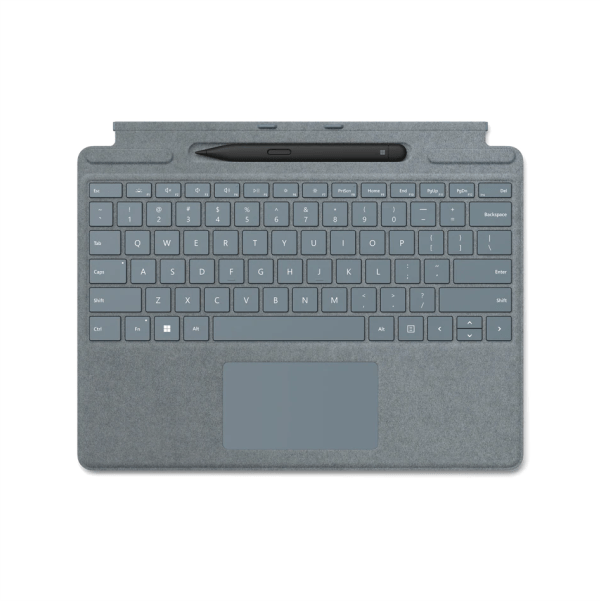
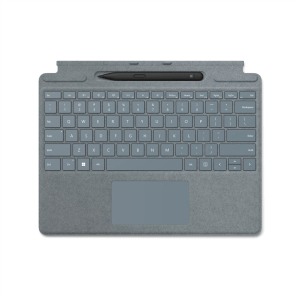
Surface Slim Pen 2 securely sits and recharges in the keyboard’s built-in storage tray. Typing and writing in one, without the bulk, Surface Pro Signature Keyboard delivers fast, accurate typing like a traditional, full-size keyboard, plus natural on-screen writing with our best inking experience yet.
Signature Keyboard with Slim Pen 2.
End of Features of Signature Keyboard and Slim Pen 2 section
Pair with Surface Pro devices
Use Surface Slim Pen 2 across the portfolio of ink-enabled Surface devices,3 and Surface Pro Signature Keyboard to transform Surface Pro 8, Surface Pro 9, or Surface Pro X into a complete laptop.
Full Specifications
| Spec |
Detail |
| Compatibility |
Surface Pro 8, Surface Pro 9, Surface Pro X |
| Keyboard Activation |
Moving (mechanical) keys, backlit |
| Keyboard Layout |
English, full row of function keys (F1-F12) |
| Pen Connection |
Bluetooth 5.0 |
| Pen Pressure Sensitivity |
4,096 pressure levels, zero force inking |
| Pen Haptic Feedback |
Compatible with Surface Pro 8 and Surface Laptop Studio (Windows 11) |
| Pen Battery |
Rechargeable lithium-ion, up to 15 hours typical usage |
| What’s in the Box |
Surface Slim Pen 2, Surface Pro Signature Keyboard, Quick Start Guide, Safety and Warranty documents |
Why Buy from Foretec Online
- Genuine, sealed products sourced for the Nigerian market
- Transparent Naira pricing with no hidden charges
- Fast delivery across Abuja, Lagos, Kano, Port Harcourt, and beyond
- Responsive customer support before and after your purchase
Order the Surface Pro Signature Keyboard Today
This unit is new and sealed. Browse more Surface accessories from Foretec, or order the Signature Keyboard with Slim Pen 2 now.
Related
Compatibility
Surface Pro Signature Keyboard
Surface Pro 8
Surface Pro X
Surface Slim Pen 2
Surface Laptop Studio
Surface Pro 3 – Surface Pro 8
Surface Pro X
Surface Duo, Surface Duo 2
Surface Go, Go 2, Surface Go 3
Surface Hub 2S
Surface Laptop 1 – 4
Surface Studio 1, 2
Surface Book 1 – 3
Surface Slim Pen 2 Tips
Non Surface devices that support Microsoft Pen Protocol (MPP)
Dimensions
Surface Pro Signature Keyboard
11.38” x 8.90” x .19” (289.1 x 226.1 x 4.89 mm)
Surface Slim Pen 2
5.38” x 0.44” x 0.25” (136.8 x 11.3 x 6.3 mm)
Weight
Surface Pro Signature Keyboard with Slim Pen 2
0.65 lbs (294 g)
Surface Pro Signature Keyboard
0.62 lbs (281 g)
Surface Slim Pen 2
0.03 lbs (13 g)
Exterior
Surface Pro Signature Keyboard
Material: Alcantara®
Colors: Poppy Red, Ice Blue, Platinum, Black
Surface Slim Pen 2
Material: Plastic Enclosure
Color: Matte Black
Connections
Surface Slim Pen 2
Bluetooth® Wireless 5.0 Technology
Interface
Surface Pro Signature Keyboard
Magnetic
Pen integration
Surface Pro Signature Keyboard
Surface Slim Pen 2 storage and charging
Keys
Surface Pro Signature Keyboard
Activation: Moving (mechanical) keys
Layout: English, full row of function keys (F1 – F12)
Dedicated buttons for Windows shortcuts, media controls, screen brightness
Right click button
Sensors
Surface Pro Signature Keyboard
Accelerometer
Buttons
Surface Slim Pen 2
Side button, Top Button with eraser functionality
Tactile signals
Surface Slim Pen 2
Haptic feedback functionality compatible only with Surface Laptop Studio1 and Surface Pro 81 with Windows 11
Pressure and sensitivity
Surface Slim Pen 2
4,096 pressure levels
Zero force inking4
Battery
Surface Slim Pen 2
Rechargeable Lithium Ion
Up to 15 hours of typical usage6
What’s in the box
Surface Slim Pen 2
Surface Pro Signature Keyboard
Quick Start Guide
Safety and Warranty documents
Related

There are no reviews yet.